Change the page while they are still on it.
Your ranker, search or module selector asks Signals what this customer is doing in this visit, and gets the answer in 6ms. Add the SDK and collection starts. There is no pipeline to build first.
Below is your own visit to this page, computed by Signals as you read.
Signals, about you
connectingSignals is computing your first attributes from the events this page just sent.
Every highlighted part is an attribute Signals computed from the behavioral data your browser sent during this visit. Open the Product menu above and watch the sentence change.
Personalization finds out after the visit.
Most profiles update on a schedule. By the time yours knows what happened in this visit, the visitor has gone.
What changes while they are still on the page.
Each of these reads what the visitor did in the last few minutes, whatever your product sells.
Higher session conversion
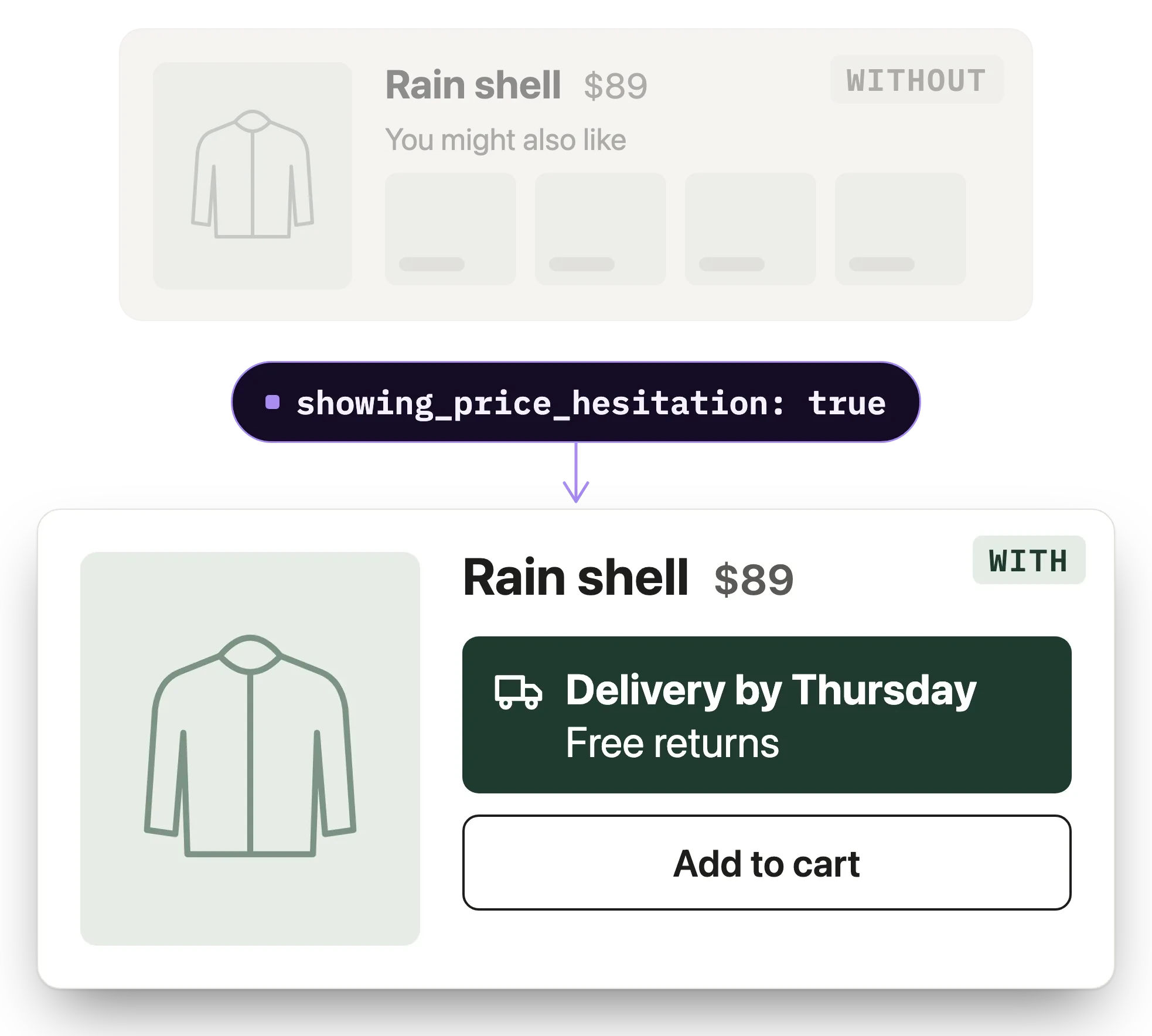
The reassurance usually lands in tomorrow's abandonment email. Signals tells your page this shopper checked delivery twice, so the delivery promise appears while they are deciding.
More articles per visit
The front page is the same for every reader. Signals tells your ranker which topics this reader opened in this visit, so the next slot follows them.
Higher activation rate
The in-app guide lags behind what a new user has just done. Signals tells your product which steps they finished, so it shows the one that is next.
Fewer searches that end in an exit
Results rank on past bookings. Signals tells your search the dates and places tried in this visit, so the next results start there.
Name the behavior once. Read it wherever the page is built.
Add a Snowplow SDK
Web, mobile or server. Events start flowing, validated against your schemas. No event stream to build first.
Name the behavior you want to react to
Repeat views of one item, a basket gone quiet, failed searches this session. Define them in the console without a ticket, or in code.
Bundle them into a service your app owns
One service, one round trip. Front-end teams do not need to know which attributes exist.
Call it where the decision is already made
Inside the ranker, the module selector or the edge function. No new decisioning layer to adopt.
Step by step: Personalize a travel booking flow →The background: Customer profiles and identity, explained →
- Braze
- Conductrics
- Algolia
- json-render by Vercel
- Snowflake
- BigQuery
One read, before the page renders.
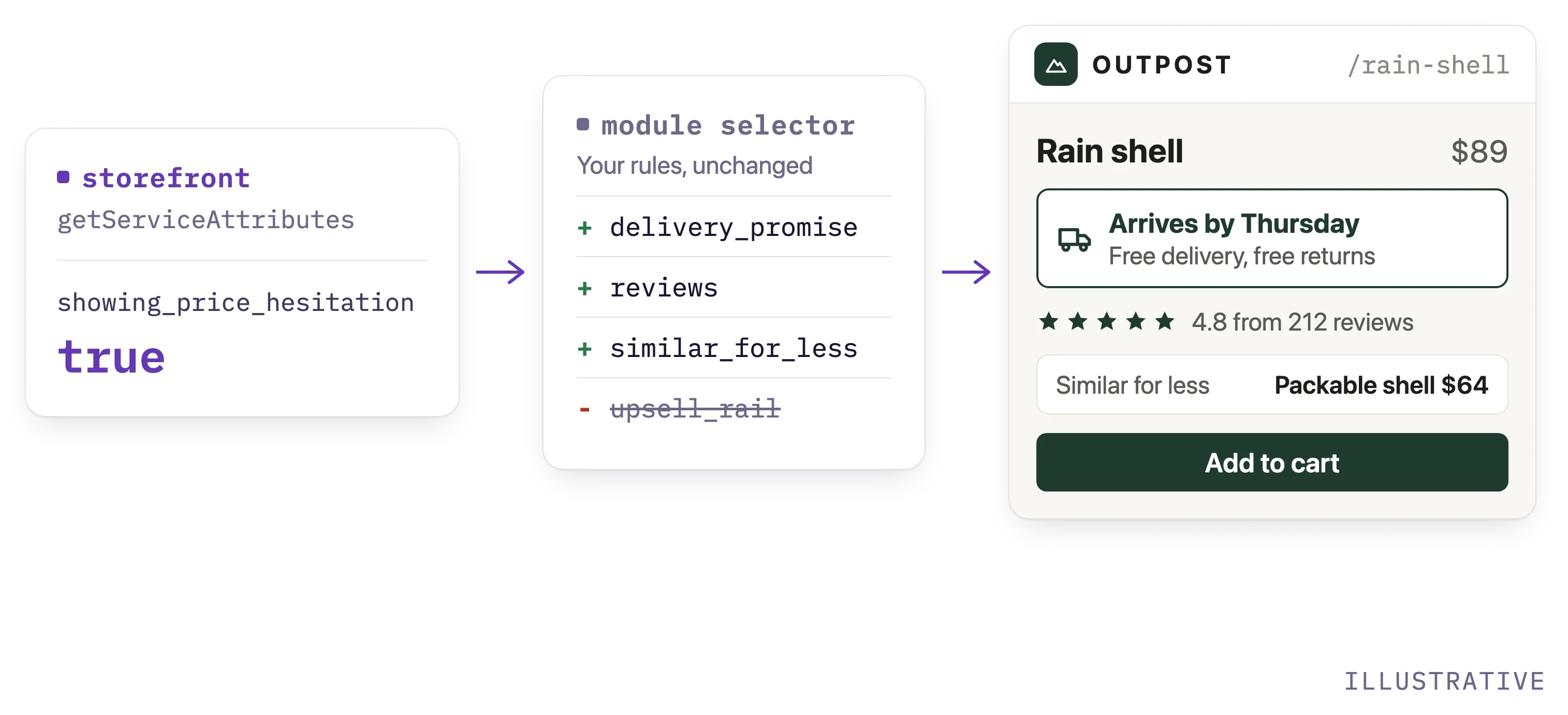
The page sends the tracker's session id to your backend. Your backend reads the storefront service and hands the values to whatever picks the modules. The credentials stay on the server.
npx plugins add snowplow/skillsimport { Signals } from "@snowplow/signals-node";
const signals = new Signals({
baseUrl, apiKey, apiKeyId, organizationId,
});
const shopper = await signals.getServiceAttributes({
name: "storefront",
attribute_key: "domain_sessionid",
identifier: sessionId,
});
// Your selector keeps its rules. It now sees this visit.
const modules = shopper.showing_price_hesitation
? ["delivery_promise", "reviews", "similar_for_less"]
: ["upsell_rail", "reviews"];Add Snowplow Signals to this app so the product page reacts to this visit. Add the Snowplow browser tracker if there is none. Define an attribute for repeat views of one product in a session, publish it in a service named storefront, and read it with getServiceAttributes in the handler that picks the page modules. Leave the selection logic as it is, so the only thing that changes is what it can see.
The read returns the attributes keyed on the session. Basket attributes take the basket id as the identifier, in a second call or a batch read.
The feature: Real-time attributes →Full reference: Retrieve attributes in your application →
Fast enough for the render path.
Added to the render path, p50 in-region
Event in to attribute updated
Streaming infrastructure for your team to run
Before you add it to a page
Does Signals decide what to show?
No. Signals tells your code what this customer is doing. Your ranker, rules or personalization tool decides what changes, with inputs from this visit.
Is this a recommendation engine?
No. If you need a packaged recommendation model, this is not it. Signals feeds the recommender you use, or the one you build, with what happened in this visit.
Do I need an event stream already?
No. Collection is part of Signals. Add a Snowplow SDK to your web, mobile or server app and events start flowing, validated against your schemas. If you already run Snowplow, Signals reads the pipeline you have.
Can a product manager define the attributes?
Yes. Attributes are defined in the console or in code. Engineers deploy them through CI/CD like any other change.
Where does it run?
Managed SaaS, or a private deployment in your own AWS or GCP account. Same architecture either way, so what you evaluate is what you run.
What do I see on the free tier?
The full product against your own traffic, up to 5 million events a month, with no card and no sales call. Define one attribute and watch it update as you click around your own site.
Watch an attribute change on your own traffic today.
Add the SDK, define showing_price_hesitation or any behavior you care about, then click around your own product and watch it change, the same way the panel above changed for you. The free tier runs on the real engine: no card, no sales call.