Signals now supports identity resolution, so a customer’s attributes no longer split between the cookie they browse with and the login they buy with. If you use Snowplow Identities, Signals can calculate attributes per person. Attributes are what Signals knows about a customer, such as their cart value or the last category they browsed, and an attribute group is a set of attributes calculated together. Key an attribute group on snowplow_id, the ID Identities gives each person, and activity from every identifier Identities links to that person counts toward one profile. Your app keeps reading with whichever identifier it already has.
How identity resolution works
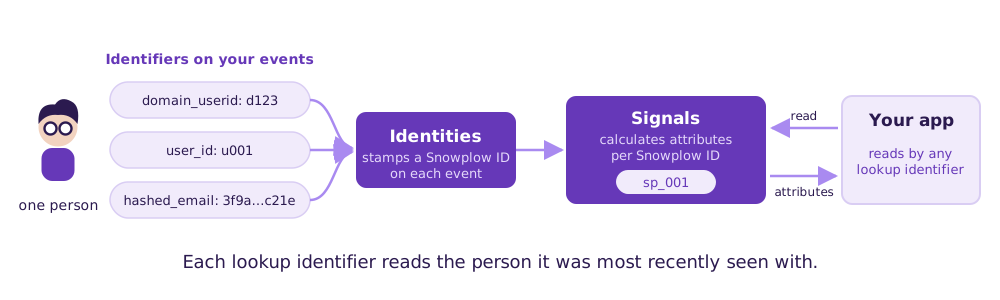
Snowplow Identities is identity resolution in your Snowplow pipeline. As each event is enriched, Identities links the identifiers on it to one Snowplow ID per person and adds that ID to the event. The matching is deterministic: it links only on the identifiers you configure, never on a guess. Signals now builds on that ID.
Three rules apply to any attribute calculated per person:
- Which identifiers count. Any identifier in your Identities configuration:
domain_userid,user_id, a mobile device ID, a hashed email, or a field of your own, such as a loyalty card number. - What Signals calculates. An attribute group keyed on the built-in
snowplow_idattribute key calculates its attributes per Snowplow ID, so per person instead of per device or per session. - How your app reads them. You select up to three lookup identifiers on
snowplow_id, and each read uses one of them. Your website can read by the cookie and your backend by theuser_id, with no changes to your app’s reads, and both get the same person’s attributes.
Example: the upsell at checkout
Say a shopper browses your store as a guest, views a pair of trail runners twice, and adds them to the cart. Then they sign in to check out with their saved details. Your backend reads attributes by user_id, and a profile keyed on user_id holds none of what they did as a guest. So checkout doesn’t know about the trail runners, and it never offers the $14 wool socks that go with them. The shopper is about to pay, which is the easiest moment to add to the order, and your store misses the upsell.
Now say your app has an attribute group keyed on snowplow_id that holds product_views, last_cart_value and last_category.
They’re on the laptop they usually shop from. Their guest browsing carries the browser’s cookie, domain_userid. They’ve signed in on this laptop before, so Identities already links that cookie and their user_id to one Snowplow ID, and their guest browsing counts toward it along with their account activity.
When they reach checkout, a read by their user_id returns a cart value of 64.00 and running as the last category, from the browsing they did as a guest. Checkout offers the wool socks before the shopper pays, so your store gets the upsell chance it used to miss. A read by the browser’s domain_userid returns the same values.
Identity resolution needs Identities on the same pipeline as your Signals deployment. If you don’t have it yet, you can set it up yourself in Console: choose the identifiers it links, such as domain_userid and user_id, and deploy the configuration. High-volume pipelines should talk to Snowplow Support before deploying.
To set up Identities, see Configure Identities, and for which identifiers to pick, Choosing identifiers.
Once Identities is running, you can set up identity resolution in Signals in three ways.
In the Console UI
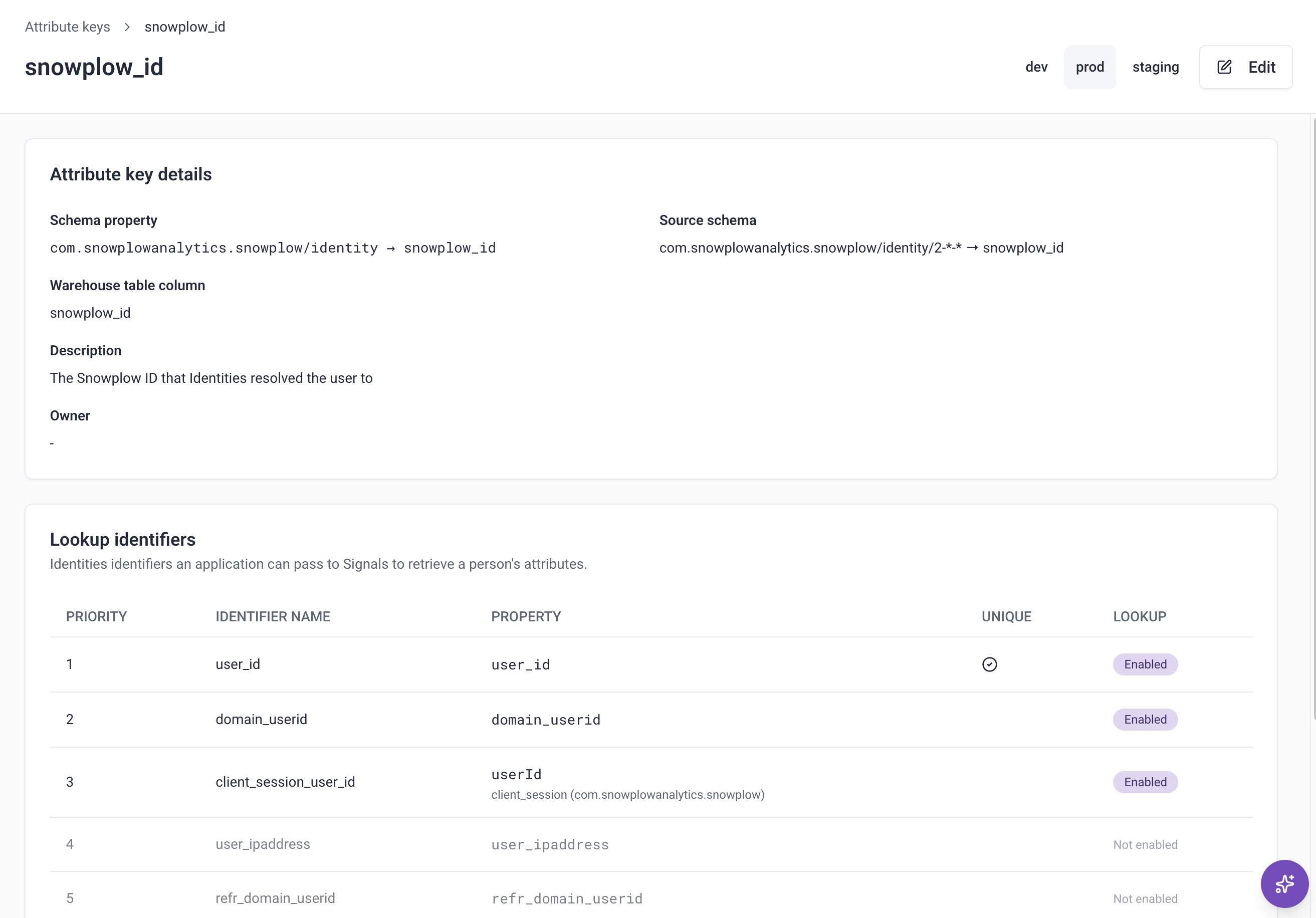
Open Signals > Attribute keys and open snowplow_id. The Lookup identifiers card lists the identifiers from your Identities configuration. Click Edit, select up to three, and click Update attribute key. Then create a stream attribute group with snowplow_id as its attribute key, and publish it.
With an AI agent
Ask the Snowplow Assistant in Console, or any agent connected to the Snowplow MCP server:
“Let my application read snowplow_id attributes by domain_userid and user_id.”
In the Python SDK
from snowplow_signals import (
    Attribute,
    AttributeKey,
    Event,
    StreamAttributeGroup,
    snowplow_id,
)

# Any attribute works per person; a page view count, for example
page_view_count = Attribute(
    name="page_view_count",
    type="int32",
    events=[
        Event(
            vendor="com.snowplowanalytics.snowplow",
            name="page_view",
            version="1-0-0",
        )
    ],
    aggregation="counter",
)

signals.publish([
    AttributeKey(name="snowplow_id", lookup_identifiers=["domain_userid", "user_id"]),
    StreamAttributeGroup(
        name="shopper_attributes",
        version=1,
        attribute_key=snowplow_id,
        attributes=[page_view_count],
    ),
])

# Your backend reads by the identifier it has
attributes = signals.get_group_attributes(
    name="shopper_attributes",
    version=1,
    attribute_key="user_id",
    identifier="u_4821",
    attributes=["page_view_count"],
)
What’s in this release
There are four use cases:
- Anonymous to known is supported: a user browses, then signs up, or logs in to an account they’ve used on that device before. A read by their
user_idincludes the browsing from before the login. - Cross-domain is supported: with cross-domain tracking enabled in Identities, a user who follows a link to another of your sites keeps one profile from that visit onward. A read by either site’s cookie returns the activity on both. If they had browsed the second site before, that earlier activity stays separate for now.
- Shared device is supported with
user_idmarked as a unique identifier in Identities: each person who logs in keeps their own profile. A read by the device’s cookie returns whoever used it last. - Cross-device is partly supported: when a user logs in to an existing account on a new device, everything from the login on counts toward their profile, and the browsing from before it stays separate for now.
Identity resolution is available in the Console UI, through the Snowplow Assistant and the MCP server, and in the Python SDK from snowplow-signals 0.4.11. The Node.js SDK reads it with no upgrade. Attributes keyed on snowplow_id start empty and build up from the events after you publish the attribute group.
To set it up, see Calculate attributes per person with identity resolution.